Author: Michael

  • On Conferences and Thanksgiving

    On a certain Thursday in November, the tradition goes that one must stuff oneself with as much food as possible and spend the next three days going through withdrawal and recovering from such a fun endeavor. The weekend immediately prior to that day, in New York, one goes through a very similar experience at the NYSCATE annual educational technology conference. The difference is that what gets stuffed is the brain with new ideas, action plans and friends met during the four-day event.

    In an effort to unpack all the information and try to come up with an action plan, here is my “top” list of items from the conference:

    Top free resource to put into action: ePals

    ePals is one of the original global collaboration websites. I’ve looked at it and learned about it many times but have never tried a project. Within a few clicks of visiting the site, you can be connected with a classroom anywhere around the world and get your classes working together. There were no formal sessions at the conference about ePals this year (that I’m aware of) but references were made to it regularly.

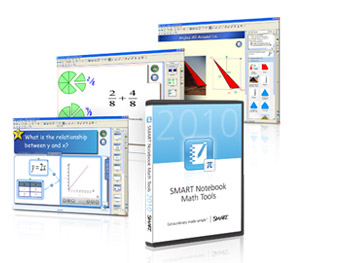
    Top pay-for resource to put into action: SMART Notebook Math Tools (currently beta)

    When math teachers get a look at the math tools in this add-on for Notebook software, I think they are going to freak out (in a good way). In a brief demo, I was very impressed by the new manipulation features available for shapes, graphing, and more. There is a new equation editor built-in as well, although that tool was not in the beta version.

    Top cool future tech trend: Plugintothesmartgrid.com

    David Jakes won the “cool new thing” demonstration hands-down when he showed this augmented reality simulation during his keynote. What is augmented reality? In a nutshell it is where you can take something in the physical world and augment its properties by interacting with a computer. Its easier to see in action – click on the link above, and if you have a webcam, try it out!


    Top thinkers & doers: David Jakes, Sylvia Martinez and Brian Smith

    The NYSCATE conference is about people and making connections. There are a lot of great people involved. Some of my favorites include David, who is a technology director in suburban Chicago. His down-to-earth and direct style is very engaging and motivating. I’ve attended workshops with him let that ultimately led to the project myself and my colleague presented this year, Google Lit Trips – What an Odyssey! Sylvia is the president of GenYes, and is refreshingly focused on involving students in all aspects of learning. Brian Smith is a technology integration specialist from the Rochester area, and is a key player in putting the conference together. He has created and maintained many of the tools that make NYSCATE work.

    Top presenter who has it figured out: Harry Tuttle

    There are lots of presenters who have it figured out, but one that stands out to me is Harry. If  you scan the presentation page at the NYSCATE wiki for his sessions, you notice something: the focus is on learning strategies, and not technology. Harry, a former board member of NYSCATE, has been presenting at the conference for years. I really like how he has always focused on topics such as thinking skills, formative feedback and assessment, and writing skills. There will always be cool new tools and tricks, but what will never change is the need for the focus to remain on learning and strategies to support it.

    My hat is off to all those involved in making NYSCATE 2009 another great success!


    Top resource I’ve known about but have never put into action
    ~ePals

    Top pay-for resource to get going with
    ~SMART Notebook Math Edition

    Top future-tech resource
    ~plugintothesmartgrid.com

    Top thinkers and doers
    ~David Jakes, Sylvia Martinez, Brian Smith

    The person who has it figured out
    ~Harry Tuttle – his presentations are about learning, not technology. Yes, he talks tech, but it is less important than the learning.

  • Online Learning is Big Business

    I recently attended a presentation by online learning vendors who have been awarded a contract by our local BOCES. They offer online courses for students who need to make up missed or failed classes (credit recovery) or want to get ahead or take a low-enrollment class (credit accrual). The vendors offered to us through this contract are Apex, Aventa, Florida Virtual Schools and Pearson NovaNET.

    The three things I came away from these presentations with are:rsscar

    1. Online learning is big business (as evidenced by the reps who flew/drove in from all over the country)
    2. Online learning is an inevitable, rich, plausible model for delivering instruction (note the order I put those in)
    3. Online learning is most effective when there is human interaction with real people along the way (read: teachers are still the most important part of learning)

    IMHO, based solely on the presentations I saw (and not too much additional research on my part yet), the programs I like the most are the ones where students have access to teachers/experts as they experience the online course. Some of the products appear to have more of a support system for this while others seem more stand-alone. All of the reps talked about how human guidance was important (although not all the products had that guidance built-in).

    It goes back to the basics of teaching and learning – anyone can be an expert in a content area. It is people who go beyond the knowledge and use their passion to connect with students who are successful in helping students achieve. All of these online systems offer the content in some rich-media, sequenced, accountable fashion. I think the ones that will be most successful for student learning are the ones that include the most important part of the learning process – people.

    Image courtesy of Shira Golding on Flickr

  • Flashback Friday: Making the Connection

    In a year-long review of items I wrote in this blog 5 years ago, this installment of Flashback Friday looks back to October 2004 and the post, Making the Connection. What I wrote:

    Kids today are connected. When they go home, they do not pick up the phone anymore. They get on the computer and IM each other. This way, they can have group conversations and keep up with more people and more events at once. If one friend IMs 4 of his buddies about going to the mall, each can ask mom or dad at the same time, and within 2-3 minutes, everyone knows who is going and what time they can go.

    We have the same connected environment for our classrooms. By using the WITS Notes pages, students and parents can stay connected to what is going on in the classroom. When teachers post assignments and events to WITS, everyone who needs to see them does automatically.

    There is no IM section in WITS, but if the need arises, that can be created as well…

    The Internet has broken down the walls of the classroom forever.

    So where are we today? How about…

    Kids today are connected. When they go home, they do not pick up the phone IM anymore. They get on the computer and IM each other They have been talking and texting on their phones since the final bell rang at school. This way, they can have group conversations and keep up with more people and more events at once. be constantly connected to those they want and need to be with. If one friend IMs Tweets 4 of his buddies about going to the mall, each can ask mom or dad at the same time, and within 2-3 minutes, everyone knows who is going and what time they can go.

    We have the same no such connected environment for our classrooms. By using the WITS Notes pages, students and parents can stay connected to what is going on in the classroom. When teachers post assignments and events to WITS, everyone who needs to see them does automatically. How the always connected world of the mobile phone will come to be a part of the learning environment remains to be seen. Some schools are starting to dabble in this, but there are lots of concerns and issues surrounding it.

    There is no IM section Twitter feed in WITS, but if the need arises, that can be created as well…

    The Internet mobile phone has broken down will disrupt the walls of the classroom forever in ways we have not yet imagined.

    That rewrite was more fun than I anticipated. The interesting part is that during those 5 years, the technology changed, the students adapted instantly, and the classroom remained the same. I wonder what my post in October of 2014 will look like?

  • A Refreshing Look at a Hot Topic

    We have certainly heard a lot about the H1N1 virus and what we should do to help prevent its spread. When I first read the email from BrainPOP that they had resources about H1N1 (swine flu), my first reaction was, “Oh, great, even Tim & Moby are talking about it.”

    I must say that I was pleasantly surprised about the swine flu video for 2 reasons – first that it is directed at students, not adults (as all BrainPOP videos are), and secondly, the treatment of the vocabulary in the video is excellent. Any key vocabulary term used in the video is displayed clearly as the conversation ensues. The video displayed while the vocabulary is on the screen gives visual cues to what the term means. This provides reinforcement for the key points, and develops vocabulary skills.

    I think the video is a good conversation starter or reinforcement to help kids express their questions and/or opinions about the H1N1 virus. Check it out:

    You can also check out the BrainPOP section on Swine Flu or BrainPOP Jr. video on Hand Washing.

  • The Writing Process

    Clear, articulate, concise writing is important for our students. The mind of a middle schooler may often be anything but clear, articulate and concise 🙂 (and that is OK). What strategies can we use to help students acquire and integrate learning of the writing process?

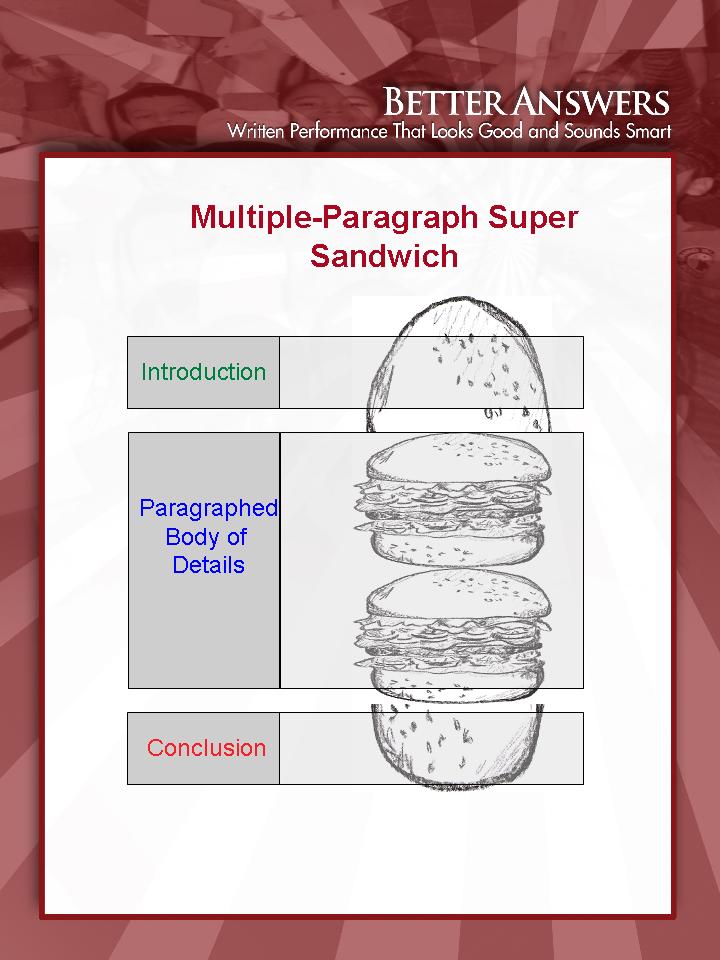
    Better Answers is a writing program we are working on here at Heim. It is a structured writing response model that builds on the strategy of cues, questions and advance organizers. The “Better Answer Sandwich” graphic sums it up best (click to enlarge):

    super_sandwich

    Using this organizer, students are directed through the writing process using specific, direct organizational ideas. The program has been used in lower grades in the past, and is now being rolled out across the school.

    How might technology support this process?  One way is with a new web resource we are piloting, the Glencoe Online Essay Grader. Teachers can assign essay topics to students, and students complete the essay online. In my first looks at the resource, there are tools that can be provided to students to formulate answers very much like the sandwich model. Additional supports (if desired) for students in this environment are sentence structure advice, spell and grammar check, and sentence diagramming.

    Other technology resources to support the writing process include:

    1. Create a template in a word processing document that includes the steps of the Better Answers process. Students download and complete an essay using the steps as a framework.
    2. Use brainstorming and organizing software (such as Inspiration) to have students graphically complete the steps of the process, and then convert the graphic diagram to a word processing document.

    Better writing is always a goal, and there are many technology tools to support it.

  • Flashback Friday: WITS for Kids

    In the last year or two many districts have been opening a web portal for parents and students to access information about what is going on in school (grades, etc.). For this month’s flashback, I wrote back in September 2004 about how our internal website, WITS (Williamsville Information Tracking System) was being opened for student and parent access (see the post, WITS for Kids).

    Its hard to believe we have had such access for five years now, and in that time, WITS has become increasingly integral to the daily routine of teaching and learning. The developers who write the program behind WITS, Chris and Dan, are incredible in how they meet the needs of a diverse community of users, be it teachers, staff, students or parents. Looking forward, many of the new tools available on the web may influence how our school community interacts with WITS.

    Happy 5th birthday, WITS for Kids!

    witslogo

  • Worksheets and the Internet

    Content Tech
    Ideas for Technology Use in the Classroom

    Using a worksheet to research information on the Internet and fill in the blanks is a popular activity. In its most worksheetfundamental state, this is a form of the strategy cues, questions, and advance organizers. Students use questions on the worksheet to (hopefully) guide them through a website and acquire the necessary information.

    When a worksheet is fill-in-the-blank, it tends to be a regurgitation of information found on the web. How might the strategy be more beneficial to the students in order for them to be not only exposed to the information, but begin to acquire, integrate and personalize the knowledge?

    A word processing document set up as a KWL chart is one option. Since the students will be using the Internet for the research, using the computer to create the document is easy. Begin with a brief warm-up where students type what they know about the topic. After some sharing, move on to having them type what they want to know. Through the use of questioning, direct students to note any other information they should want to know if they did not come up with the questions on their own. During the investigation process, students look for the information based on their own inquiry, making the process more meaningful. At the end of the lesson, students indicate on the word processing document what they have learned. The entire document can be submitted or posted electronically with ease.

    Worksheets structured to use the technology available can help to increase the acquisition of knowledge in many ways. Other thoughts/ideas most welcome!

    Image courtesy of christopherl on Flickr

  • Flashback Friday: What Matters?

    In this month’s flashback, one of the posts I wrote in August 2004 is What Matters? The two questions I posed regarding if using technology in a lesson are appropriate were:

    1. Does the technology allow for new and unique learning experiences that are not possible without it?
    2. Does the technology allow for increased, more efficient learning that is not be possible without it?

    Those questions are still applicable, but as I think about how technology fits into the learning process, I believe the better questions are:

    1. What is the learning goal?
    2. How will you know when students achieve the goal?
    3. How will you foster progress toward the goal?
    4. How will you help students practice, review and apply the learning?

    These questions look amazingly similar to the planning questions for instruction (courtesy of Robert Marzano), because that is where they come from. What is most important about these questions? The word technology is not used at all. From these goals, specific strategies for instruction are formulated, and from those strategies, technology tools can be selected to match the strategy (or not selected if appropriate). If a technology supports the strategy, then it is an appropriate use. Technology use because it is slick, new, or a substitute for real learning is not appropriate.

    What Matters? Learning. Technology does not (a hard thing for a technology integrator to say…).

    littlegirlcellphone
    Image by Spitzgogo on Flickr

  • Unplugged & Unwound

    A little music to accompany this post…

    Clear Waters Music: Clear Waters by Kevin MacLeod

    We just returned from a family vacation in Lake George. I purposely did not bring the laptop, iPod touch, or any other gadget. I considered not bringing the cellphone, but it does prove helpful on occasion. A week without email, Google Reader, or any other always-connected medium. It was AWESOME. I’ll be the first to admit I have some of the affliction I call connection-addiction. This means I regularly have to check my aggregator to see what has happened recently, or keep up with who is saying what. And I don’t even have a Facebook or Twitter account. My daily routine ends up being checking/reading/responding/writing in a constant stream, sometimes to a fault.

    So, without the connections, what did I do? With my family, I…

    • Read books (the old-school hardcover kind)
    • Swam in the pool
    • Swam in the lake
    • Made fires in the firepit
    • Went to an amusement park
    • Rode a steamboat
    • Went for a hike
    • Went for a drive
    • Slept in

    I thought I might have withdrawl symptoms from being disconnected, but you know what? None. Zippo. Nein. It was relaxing and fun to stop the daily madness and unwind. When we returned, I took a little time to look through all the emails, etc. 95% could be deleted, ignored, or marked as read. Granted, it’s still summer break, so it’s easier to ignore things.

    It’s amazing what being disconnected feels like. I think I might make it a more frequent habit to maintain some balance. This might be more fuel to my personal decision to not Facebook or Twitter…

  • Flashback Friday: Goals for this Blog

    Point A to Point B is celebrating what I think is a reasonable milestone – the five year mark. I began this blog immediately after attending the National Educational Computing Conference (NECC) in 2004 in New Orleans. The sessions that stand out in my mind from then are Bernie Dodge’s spotlight session on wikis (at that point, more did not know what one was than did) and David Thornburg’s spolight session on the direction of media and learning for students. It was at Thornburg’s session that I decided to just jump in and start writing. Teacherhosting.com was a major sponsor that year, so I got on board with their hosting plan, and off I went.

    It’s been a fun 5 years. This blog has been an outlet for me to teach, think, and reflect. To that end, I’m going to begin a once-monthly-ish entry titled “Flashback Friday” to look back at a post or posts from 5 years ago to see if anything has changed.

    For this inaugural flashback, the best candidate for review is one of my first posts, “Goals for this Blog:”

    “There are so many cool things happening in computer technology. Every day I hear of something great that would be super to try in school. It can be hard for everyone to learn about and keep up with what is going on, so this Blog will serve as a diary of what we are doing, or are planning to do.”

    I think this goal is a realistic one, and one I’ve held to throughout. As a technology integrator in a school building, my target audience is the people in my building and my district. I sometime write for the bigger global audience, and also for targeted audiences, like the Video in the Classroom page for workshops I do. Primarily, though, I try to sift and sort through what’s going on and provide some clarity and direction. Sometimes I just blather on about what’s on my mind. Still, I think the goal for this blog remains valid to this day, and is worth continuing.

    One way I want to improve the focus is by including more items targeted towards students and/or parents. I’ve got a good handle on how to write for teachers and staff, but I’d like to get better at sharing with other groups in the school community.

    If you’ve gotten this far and are a glutton for punishment, you can click on the archives link on the left to see what else was on my mind in July of 2004…

    Courtesy of KTDEE on Flickr
    "Goal Post," by KTDEE on Flickr