Author: Michael

  • Content Tech: Reinforcing Effort

    Content Tech
    Ideas for Technology Use in the Classroom

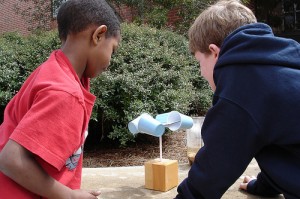
    In an ongoing look at the book, Using Technology with Classroom Instruction that Works, the next strategy is reinforcing effort. Probably the single biggest factor affecting student performance is the ability to “stick with it” until successful.

    Technology can be a tough one to incorporate into reinforcing effort, as it is a mode of working as opposed to a skill or concept to be learned. Pitler et al discuss an interesting scenario in which spreadsheets can be used to help reinforce effort. First, students are provided with a rubric that reinforces effort. The categories include class notes, attention, participation, homework and studying. During the course of a unit of instruction, students rate their daily effort according to the rubric in a spreadsheet. At the end of the unit, the students reflect on the chart of their effort ranking compared to their achievement. The teacher can also create an aggregated chart showing class averages.

    While there is a good amount of work in doing something like this, it targets exactly the goal that, “…reinforcing effort enhances students’ understanding of the relationship between effort and achievement by addressing their attitudes and beliefs about learning.”

    effort
    Image courtesy of Capt Kodak on Flickr

  • TTT: Printing Gridlines in Excel

    Tuesday’s Technology Tip
    Little ‘bytes’ of information to hopefully make your computing life easier.

    In Microsoft Excel, the lines between every row and column are called gridlines. Gridlines do not print by default, and there may be times when you want the gridlines on your printout.

    If you want gridlines to show when you print a spreadsheet….

    • From the File menu, choose Page Setup
    • Click on the Sheet tab
    • Check the Gridlines check box in the Print area
    • Click OK

    ∞∞∞∞∞∞∞∞∞∞∞∞∞∞∞∞∞∞∞∞∞∞∞∞∞∞∞∞∞∞∞∞∞∞∞∞∞∞∞∞∞∞∞∞∞

    This tip is taken from Nancy Wilhelm’s great Tips & Tricks newsletter. A new issue appears monthly, and can be found on the homepage of WITS. Loook in Public Documents | Common for Entire District | Tips & Tricks | Newsletter.

  • The Children’s Machine

    Here is an audio track to accompany this post, if you like: luminous-rain
    Music courtesy of Kevin MacLeod

    My recent purchase of an XO laptop moved me to finally dip into the writing of Seymour Papert and his often-referenced book, The Children’s Machine: Rethinking School In The Age Of The Computer. Being in the midst of lots of reading for the administration classes I’m taking, I still found it a challenge to get into the academic and wordy mind of Papert. This is definitely a book that will need re-reading (and is well worth it).

    Let’s start with a few bigger-picuture ideas I took from the book:

    • It was written over 15 years ago (1993), but the concepts and challenges presented are as fresh as ever. I often found myself in agreement with Papert’s thoughts, only to realize how long ago he made them. For example, when he references “…the powerful contribution of the new technologies…is the creation of personal media capable of supporting a wide range of intellectual styles,” what was on his mind? 1993 was long before Web 2.0 (and a lot of Web 1.0), smart phones and iPods. We are only beginning to realize the power of these new technologies.
    • I particularly enjoy the focus on learning as a distinct, enjoyable activity, rather than something to get done (Yearners vs. Schoolers, chapter 1; A Word for Learning, chapter 5). Papert talks about how real-life learning is a process of discovery based on need. As we engage deeper into learning about things that are important to us, the new knowledge “sticks,” adding to previous knowledge. I like this analogy, as it resonates with how I feel I increase my technology knowledge. As I am exposed to new ideas or concepts, I can categorize them based on prior knowledge, and call on them as needed. I always enjoy going to technology workshops, even beginner workshops, because there is always some new aspect or interpretation that I can add to my own knowledge library. Papert challenges the traditional conept of school as a place that disseminates knowledge to become one that promotes discovery of it.
    • No big surprise here, but Papert explicitly explains that using the computer a a knowledge machine most likely will not increase scores on high-stakes tests. It will produce creative thinkers with a personal relationship to significant concepts and content. It is almost funny (or sad) that his responses in 1993 were to the America 2000 initiative. 15 years later, we now call it No Child Left Behind.
    • Papert makes a case that perhaps reading and writing should no longer be the first way in which children become knowledge literate. I have a REALLY hard time with that thought – but when people use video sites such as YouTube to learn, it makes one pause and think. I sure wish there were an audio or video version of the book to help me get my head more around it…

    A quote from the book that I feel sums up Papert’s thesis, and most of his work in educational computing, is as follows:

    “[Computers] should serve children as instruments to work with and to think with, as the means to carry out projects, the source of concepts to think new ideas.”

    Logo is the programming language he created, and is the central topic of discussion throughout the book to demonstrate his beliefs. Logo is not about making a turtle move around the screen; it is about making students think about their learning.

    Flashback to my high school days when I had my brand new Commodore 64 on the dining room table (you can now do the math on my age…). I sat there with the cassette drive, typing “Load, *8” and waiting 10 minutes for a program to get into memory so I could run it. I used the book on Basic to write a 60 line program that added a few numbers together. I thought to myself, “I’m not going to be a computer programmer – I’m going to be a computer user.” This appears to fly in the face of Papert’s view of the machine as learning agent.

    Fast forward to 2009 – I regularly edit the code in the template that this blog is based on to make it look like I want it to. I just finished editing the Wikipedia article on the OLPC XO-1 to include a reference to Papert’s book. I looked at the code for other parts of the entry to figure out how on earth to make the correct syntax for the entry. What happened? I moved from a user to a programmer – not a programmer in the true sense, but the code to interpret in blogging software or wiki software is far more complex that the Basic language I shunned many years ago. The difference is in the product – while it was not worth the time to spend hours writing code to add some numbers, it is worth spending time when the results are far more satisfying. To take the quote from WordPress, “Code is Poetry.”

    I’m just beginning to understand the impact of Papert’s writing, and how it affects me personally and children (and schools) overall. One thing is for sure – as we look around at the XO, netbooks, ultra-mobile PCs, smart phones, etc. – The Children’s Machine is here. What are we going to do with it?

  • Content Tech: Cooperative Learning

    Content Tech
    Ideas for Technology Use in the Classroom

    In an ongoing look at the book,
    Using Technology with Classroomcooperative Instruction that Works, the next strategy is cooperative learning. The research indicates that when technology is used collaboratively, there is a modest increase in effect size (learning).

    Multimeda, and specifically creating a video, is a perfect way to structure student learning cooperatively. When students work in teams to create a video, it forces them to construct meaning and perform it as well. One big caveat about using video projects is best said by the authors:

    “Creating a video is a complex task that requires many roles and responsibilities. By nature, both multimedia projects and cooperative learning groups require attention to detail in the planning process.”

    Students have no problem working with video technology – they are surrounded by it, and really enjoy it. When they get the opportunity to do a video, it is very motivating. Two items that help to foster quality video projects are rubrics and storyboards.

    As with any work, having a rubric to frame a video assignment is very helpful. The website Rubistar has many different examples of multimedia rubrics that can easily be refined and revised. I’ve used them many times as a resource, and then altered them to include content-specific criteria in addition to technical criteria.

    Storyboarding is just like pre-writing. Having a plan for a video is especially important because it makes students think about what resources they will need for the video (location/equipment/materials, etc.). Experience has shown that students do not necessarliy like the storyboarding process, but it definitley helps the product.

    Video projects are possible in any class – we’ve done videos in ELA, Social Studies, Science, LOTE, and more. They provide a valuable way to engage students in cooperative learning.

    Photo courtesy of Mulsanne on Flickr

  • TTT: The Shift Key

    Tuesday’s Technology Tip
    Little ‘bytes’ of information to hopefully make your computing life easier.

    Drawing lines and shapes is easy to do in Microsoft Word, PowerPoint, and many other programs. If you want to draw straight lines, or perfect circles, squares, etc., use the shift key. When you click and drag while holding down the shift key, it signals the program to make the object conform to straight and/or equal proportions.

    ∞∞∞∞∞∞∞∞∞∞∞∞∞∞∞∞∞∞∞∞∞∞∞∞∞∞∞∞∞∞∞∞∞∞∞∞∞∞∞∞∞∞∞∞∞

    This tip is taken from Nancy Wilhelm’s great Tips & Tricks newsletter. A new issue appears monthly, and can be found on the homepage of WITS. Loook in Public Documents | Common for Entire District | Tips & Tricks | Newsletter.

  • Content Tech: Summarizing and Note Taking

    Content Tech
    Ideas for Technology Use in the Classroom

    In an ongoing look at the book, Using Technology With Classroom Instruction That Works, the next strategy for improving instruction is summarizing and note taking. As adults and educators, these techniques have become second nature to what we do. Students who are not used to pulling important information from reading and instruction need help in order to succeed.

    Of the technology tools discussed in this chapter (word processing applications, organizing and brainstorming software, multimedia, web resources and communication software), I’m going to focus on organizing and brainstorming software. More specifically, we’ll look at how Inspiration can be used as a tool to help with summarizing and taking notes.

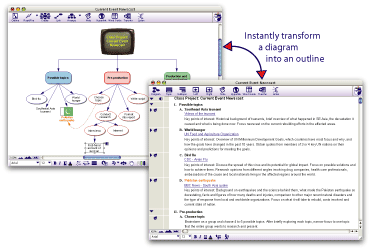
    Marzano’s research on summarizing recomments using summary frames as a key way to help students summarize. Inspiration includes many templates that can help in this task, whether in a group (with a projector) or individually (in a computer lab). For example, if you want to use a problem/solution summary frame to analyze a topic, you can use the Problem Solution template in Inspiration to begin (found by choosing File | Open Template | Thinking Skills | Problem Solution.ist).

    In the book, Pitler et al recommend that students learn and use a variety of note taking formats, including combination notes. Inspiration can be used to create a combination note template, where facts/notes are on the upper left side of the page, graphics (from the library or other source) are on the upper right side of the page, and summary sentences are located at the bottom of the page. Addtionally, there are many templates available in Inspiraiton that are excellent to support note taking as well (choose File | Open Template to explore).

    Summarizing and note taking can be a challenge for students. Organizing and brainstorming software like Inspiration can be a very useful tool.

    currentevent

    Image from Inspiration

  • Content Tech: Nonlinguistic Representation

    Content Tech
    Ideas for Technology Use in the Classroom

    In an ongoing review of the book Using Technology with Classroom Instruction that Works, we will look at the strategy of nonlinguistic representation. A part of the introduction to this chapter grabbed my attention, so I’m going to take a slightly different approach to discussing this strategy. Instead of highlighting a particular tool to support instrcution, I’m going to spend a little time looking forward and predicting, based on what the authors wrote.

    The book is copyrighted in 2007, which means the text was written most likely in the 2006-2007 timeframe. In the introductory portion of this section, Pitler et al write the following:

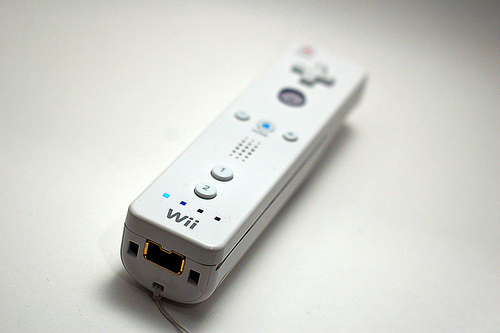
    “Nintendo has already launched a video game console called Wii that finally allows kinesthetic learners to fully apply their strenghts to video games. The console controller fuses the familiarity of a remote control with the sophistication of motion-sensing technology. This Bluetooth input device allows for full-range movement. For example, in a tennis game, it serves as a racket you swing with your arm. In a driving game, it serves as your steering wheel. In addition to its pointing and motion-sensing abilities, the Wii remote also includes a speaker and rumble feature. It’s only a matter of time before educators will be able to leverage this technology.”

    Fast forward to 2009 – the Wii is a wildly successful system. Along with that, we’ve also seen the introduction of the iPod Touch/iPhone with the multi-touch screen and accelerometer to sense motion. The price of these technologies is coming down, and more and more devices come out every day. The time where we can leverage this technology in school may be closer than we think.

    So how might a motion sensing/touch screen device help learning? Here are just a few thoughts…

    • Art – students use a motion sensing tool to paint using full body motions
    • Geometry – drawing and measuring shapes in the air to physically feel area and depth while manipulating a model
    • History – students use a simulation to act as a gunner on the USS Arizona during the Pearl Harbor attack, feeling the vibration while firing
    • Technology – multi-touch pads are used to build 3D scale models

    There may be virtually endless possibilites for these new devices, and they may come our way in the no-so-distant wiimotefuture!

    Image courtesy of B Tal on Flickr

  • TTT: Default Printer

    Tuesday’s Technology Tip
    Little “bytes” of information to help make your computing life easier.

    You can have every printer in the building set up in your profile, and print to any one when you need to. If there is one printer you use the most, it is easy to set it as your default printer.

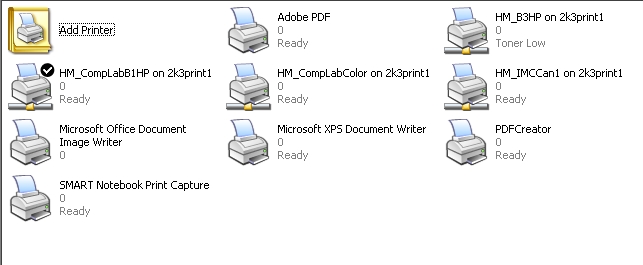
    1. In the Start menu, click on Settings | Printers and Faxes
    2. The printer with the check mark on it is the current default printer
    3. To change the default printer, right-click the printer you want to set as your default
    4. Choose Set as Default Printer from the menu
    5. The check mark should now appear on this printer

    Happy printing 🙂

    defaultprinter1

  • A Crayola Bomb for Christmas

    Having a kindergarten child has prompted me to (finally) read Robert Fulghum’s entertaining and enlightening book, All I Really Need to Know I Learned in Kindergarten. Since I’m so late to the book, its actually the 15th anniversary edition I’m exploring. I’m going to skip the bullet points of the rules of kindergarten, and instead, present five quotes from the book that stood out for me in terms of a huge laugh or resonating feeling or memory.

    The Rest of the Story
    Fulgham describes the ending he used to convince his children to go to sleep after story time while the sleepy kids wanted more:

    “The father sold all the children who would not go to sleep to a passing gypsy who ground them into sausage meat. The first children to be ground up were those who would not stop asking questions.”

    While funnier in context, I burst out laughing because it is so true that we sometimes resort to bizarre tactics to quell the insatiable need of children to question and wonder. Sad thing is that by the time they get through school, we often succeed.

    Jumper Cables and the Good Samaritan
    This story is about how Fulghum tried to help a stranger jump start his car when neither really knew how:

    “I thought he knew what he was doing, and kind of went along with it. Guess he did the same. And we hooked it up real tight and turned the ignition key in both cars at the same time. And there was this electrical arc between the cars that not only fried his ignition system, it welded the jumper cables to my battery and knocked  the baseball cap off his head.”

    I laughed out loud at the description (easier to laugh since no one got hurt). What rings true are the times I know I’ve been in a similar position (not necessarily as dangerous) and rather than simply saying, “I don’t know,” I pretended to. Admitting ignorance and asking for help are signs of strength, not weakness. Why do we often think the opposite?

    Pickup Truck
    While talking about how autos are about image for Americans and not transportation, Fulghum describes his perfect vehicle:

    “I remember riding home on a summer’s eve in the back of an ancient Ford pickup truck, with two eight-year-old cousins for company and my uncle Roscoe at the wheel. We’d been swimming and were sitting on inner tubes for comfort, and had a couple of old quilts and an elderly dog wrapped close for warmth. We were eating chocolate cookies and drinking sweet milk out of a Mason jar, and singing our lungs out with unending verses of “Ninety-nine Bottles of Beer on the Wall.” With stars and moon and God above, and sweet dreams at the end of the journey home. And not a care in the world.”

    Talk about imagery – those words got me to thinking about the “good old days” of growing up. The summer weeks spent away at my Aunt’s house (and the girl I had a crush on there). The endless nights playing in the neighborhood with whatever kids could make it (meaning those who were not grounded because of a previous night’s activities…). It’s a shame that as life progresses, it gets harder and harder to have those timeless experiences.

    Census
    Counting tangible things (such as people) is the subject of this story, but Fulghum’s point is that truly important things are hard to count:

    “Fulghum’s Exchange Principle…Every person passing through this life will unknowingly leave something and take something away. Most of this “something” cannot be seen or heard or numbered or scientifically detected or counted. It’s what we leave in the minds of other people and what they leave in ours.”

    Pow. In a few words, that’s why teachers do what they do. As I reflect on Fulghum’s principle, I think it is going to make it onto my very short list of favorite quotes. That list used to have one quote on it – I think it will now have two.

    Crayolas
    The most famous brand of crayon known around the world is at the heart of Fulghum’s invention:

    “Maybe we should develop a Crayola bomb as our next secret weapon. A happiness weapon. A Beauty bomb. And every time a crisis developed, we would launch one first – before we tried anything else. It would explode high in the air-explode softly-and send thousands, millions, of little parachutes into the air. Floating down to earth-boxes of Crayolas. And we wouldn’t go cheap, either-not little boxes of eight. Boxes of sixty-four, with the sharpener built right in. With silver and gold and copper, magenta and peach and lime, amber and umber and all the rest. and people would smile and get a little funny look on their faces and cover the world with imagination instead of death. A child who touched one wouldn’t have his hand blown off.”

    What do I want? A Crayola bomb for Christmas. How about you?

    Image courtesy of bcymet on Flickr.

    Book citation:
    Fulghum, Robert. All I Really Need to Know I Learned in Kindergarten. New York: Ballantine, 2003.

  • Content Tech: Cues, Questions and Advance Organizers

    Content Tech
    Ideas for Technology Use in the Classroom 

    In our ongoing look at the book, Using Technology with Classroom Instruction that Works, the next planning question is, “Which strategies will help students acquire and integrate learning?” This question obviously has the most strategies since this is where most learning takes place. Cues, questions and advance organizers is the first strategy in this section.

    Many technology tools are available to support cues, questions and advance organizers. I’m going to highlight two – organizing and brainstorming software and multimedia. Inspiration is a great tool to brainstorm and organize information. In a class setting, an Inspiration document can be projected on the screen. Using the rapid-fire tool, activating prior knowledge on a topic can quickly be facilitated while students call out what they know on the topic. The Inspiration map can then be organized into groups, and with one click, converted to an outline to drive upcoming instruction. In a lab setting, students can create individual knowledge maps of what they know.

    According to a research study from 2004, students who were given a multimedia advance organizer (for example, a PowerPoint) to guide their learning retained more information than students who did not use such an organizer. If you create a multimedia file for students to use as a learning guide, it could be shared through your teacher notes page in WITS, or through the Y: drive on the network.

    Image citation:
    Open Book with Question Mark. Corbis. 2008. Discovery Education. 17 December 2008 <http://streaming.discoveryeducation.com/>Â