
• Sweet Camcorder

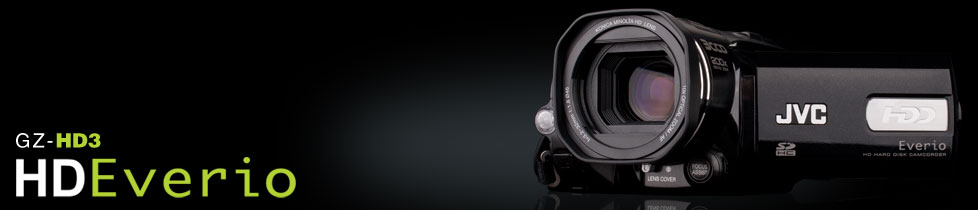
    I was at a friend’s house over the weekend for a suprise party. They have a brand new HD camcorder that I noticed on the counter. You know how sometimes you see something, pick it up, and get that OH WOW feeling? Well that’s just what I got with this baby…it’s a JVC Everio GZ-HD3, 60 GB hard drive, HD camcorder.

    static210.jpg

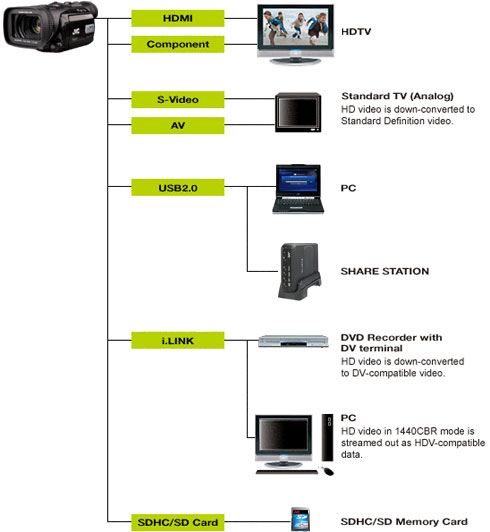
    There are a number of wow things on it, and I do not know how JVC HD camcorders stack up to the competition, but I can tell you that picking this up and using it was awesome. Among the things in this $700 (via Amazon) package is a 3CCD lens, HD recording, HDMI connector, external mic input, and lots more. In terms of connections to other devices – take a look:

    04av_f02_img01.jpg

    It is amazing to see what a (comparatively) small amount of money will buy in camcorders these days. We paid the same, or more, for cameras just a few years ago that do not hold a candle to what this has on board.

    The HD movement in video, and digital broadcasting of all TV by next year, has lots of implications for how we move forward in schools. We have no equipment that truly supports the new video standards. A camcorder such as this JVC model would be the tip of a huge iceberg in terms of the type of equipment we would need to realize its potential. While we begin to think about that, I’ll have my nose pressed up against the store window drooling at this delightful piece of technology!

    Image citation:
    “Everio GZ-HD3.” JVC Video Camcorder Site. JVC Corp. 8 Mar. 2008 <http://camcorder.jvc.com/index.jsp>. Path: Everio High Definition; GZ-HD3.

  • A Quick Mashup of Some Reading

    I’ve just been reading Jim Collins’ book, Good to Great: Why Some Companies Make the Leap…and Others Don’t. At the same time, just the other day a colleague forwarded a link to the Cisco/Metiri Group report, Technology in School: What the Research Says. I’m going to throw out a quote or two from each, to look at them side-by-side:

    “The good-to-great companies never began their transitions with pioneering technology, for the simple reason that you cannot make good use of technology until you know which technologies are relevant. And which are those? Those-and only those-that link directly to the three intersecting circles of the Hedgehog Concept.” (Collins p.152-3)

    Indeed, you could have given the exact same technology at the exact same time to any number of companies with the exact same resources as Nucor – and even still, they would have failed to deliver Nucor’s results. Like the Daytona 500, the primary variable in winning is not the car, but the driver and his team. Not thathe car is unimportant, but it is secondary.” (Collins p.156)

    “Researchers find that extracting the full learning return from a technology investment requires much more than the mere introduction of technology with software and web resources aligned with the curriculum. It requires the triangulation of content, sound principles of learning, and high-quality teaching – all of which must be aligned with assessment and accountability.” (Metiri Group p.3)

    I don’t yet know why these are the jump-out quotes for me, but they are. Educational technologists are constantly learning about the latest and greatest, but that’s not enough. To really make change, to make a difference, there has to be careful study of goals, and how or which technologies will propel toward it. And, as always, people are central to this. Good teaching and learning is done by good teachers. Collins repeatedly speaks of “having the right people on the bus.” After that, the rest, including technology, should fall into place.

    Sorry if this is coming across unclear or incomplete – I’m struggling with what I’m trying to say. I’ll put this up and come back in a bit and maybe try to restate where I’m coming from. Definitely tag this a Russo Rambling!

    ***Update 1 March 2008
    What I’m trying to say is that what is most important in the learning process is people who are passionate about what they do, are lifelong learners, and strive to learn about and use any tool that will make their craft better. We don’t have to throw out the “old model” of school – we have to throw out the people who do not aspire to the above. As Collins would say, get them off the bus.

    Citations:
    Collins, Jim. Good to Great: Why Some Companies Make the Leap and Others Don’t. New York: HarperCollins, 2001.

    Metiri Group. Technology in Schools: What the Research Says. 23 Feb. 2008 <http://www.cisco.com/web/strategy/docs/education/TechnologyinSchoolsReport.pdf>.

  • The Best Free Software

    The current issue (March 2008) of PC Magazine features an article, The Best Free Software: 157 Apps for Work and Play (p.78). This got my attention not only due to the attractive price, but more since its getting close to the time where we determine what software we want installed on our computers for next year. If we offer some of these tools on our school computers, the transition to their use at home is much more seamless (from a cost and functional standpoint). I’m going to focus on the apps with classroom and educational focus, as opposed to utility/security tools.

    A few of the top picks mentioned are things we already use – Adobe Reader, Firefox, and iTunes. Reader and iTunes are proprietary, and there are alternatives (see Songbird, below), but these two have weaved their way into the “fabric” of everyday computing life. Firefox is a delightful, customizable, web browser. A perfect example of an extension of Firefox is how I’m composing this post – using the Scribefire extension, which allows me to blog directly from any web page.

    My top picks from the article’s list:

    • Audacity – we already use this to some extent – a great audio editor – just need to roll it out for everyone.
    • GIMP – open source Photoshop-like program – I’ve never used it, but hear great things about it.
    • OpenOffice – perfect for the students who do not have access to a commercial office suite at home.
    • Skype – computer-to-computer (or landline) voice/video calling – not sure how this would be (mis)used in a school setting, but the possibilities are endless. It’s desktop videoconferencing – we have had requests in the past for out-of-town parents to Skype in to their child’s presentation.
    • Songbird – I’m not familiar with this one, but is dubbed an open source answer to iTunes – sounds intriguing. **Update – Songbird is still in the developer stage, not rollout stage. Looking at it a bit more, it definitely sounds intriguing. Worth a read at the site about what they are up to.
    • Googlepedia – A Firefox extension that puts Wikipedia results along side Google search results (if/when Wikipedia is not blocked…)
    • Google Earth – The neat applications being built around Goolge Earth are growing – a fabulous tool.
    • Second Life – There is a lot of buzz about the educational appliations of Second Life. I have an avatar, and have flown around a bit. I’m not sold by any means on this one. If I’m going to spend that much time creating a virutal world, there are already many options of online conferencing, streaming, etc. where kids could interact with experts and communities, and not worry about what their avatar is wearing or how to build an island. That being said, maybe having it and trying it would be useful.

    2 apps that come to mind that were not mentioned in the article:

    • Sketchup – Googles 3D modeling program – very versatile, very good – I know an architect who has stopped using commercial CAD programs altogether, and now uses Sketchup.
    • Scratch – The MIT graphics program – I have no personal experience or opinion on it, but I read positive reviews on it, and MIT knows a thing or two about educational computing!

    Note that at least half of the apps mentioned in the article are web-based, and so there is nothing to install. That is a dream for any IT department, and the way many software tools are going. The Web 2.0 world is online, and so is the software to do it. I won’t go into those titles right now since there is enough here to chew on.

    I wonder if there are any other installation-based software apps that we should be sure are in the hands of students and teachers?

  • A Webkinz World

    webkinz.jpgMeet the newest members of our household. Thanks to a Christmas present from a neighbor, we are officially a Webkinz household. They are darn cute, I must say. Having 2 preschoolers, we (my wife and I) are on the brink of truly experiencing what the next generation is going to grow up with. There is lots of talk about not knowing what jobs will exist or what technology will exist in 10 years. Any time those conversations come up, I try to put my kids’ faces on it and wonder what it will be like for them, and what I can do to make it better.

    Back to the Webkinz, though. Talk about seeing how kids are attracted to technology – do an informal poll of 4th or 5th grade students – many or most have a cell phone, but they ALL have a Webkinz (or 3 or 7 or 10) pet. I’m going to try to verbalize my initial reactions to the web portion of Webkinz without being too judgemental, and compare it to my younger days.

    The Webkinz site is a marketers dream come true – it does an incredible job of getting kids to come back every day (or every hour), creating must-have materialistic needs and gambling hopes in the youngest of children. Oops, sorry, I was going to try not to be too judgemental – I’ll keep working at it. The site is absolutely entertaining, though. I think back to when I was an Atari 2600 fanatic, and also spent too much time in the local arcades pumping quarters into the machines. Had something like this been around, I would have been first in line to get one.

    The site does a good job of keeping kids safe (restricted chat, etc.) and a parental control account lets parents put limits on chat features and more. The advertising is all Webkinz related (why on earth would they want to advertise something not on their own site???), and overall, its a fun way for kids to play – technologically. This is where it is ever so important to keep balance – the amount of technological play available to our kids has exploded. The virtual world has reached down to the youngest kids, taught them how to use a mouse, and has them hooked.

    So, what to do? Throw the Webkinz out, and block the Internet? Probably not a good solution – today it’s Webkinz, tomorrow, who knows (kinda like MySpace -> Facebook). I had lots of down time as a kid, and played lots of video games. I think I turned out OK (depending on who you ask…) What is different about the new trends for kids is the online component. What is not new is the “must-have” mentality (such as the Cabbage Patch craze). The Internet has provided a whole new host of marketing tools for businesses, and as I have said previously, businesses are in the business of making money, and will pursue whatever avenue they can to be successful. You can’t blame them for doing it, but you have to be ever so careful not to get caught up in it.

    Balance is the key concept here – and one that has always been a key in growing kids the right way. How do we balance the developmental capability of student’s brains (what they are capable of) in this new technological time with what they need to learn in school?

    Parting thought #1: I wonder what the first website is a child who recieves an XO laptop goes to?

    Parting thought #2: I wonder if there is any kickback from Webkinz for the free publicity for their site?

  • Delete Cyberbullying

    At a regional technology integrators meeting on Friday I was introduced to some new (to me) materials to help make the point of what cyberbullying can look and feel like. Click below to hear a brief, direct, audio message from The National Crime Prevention Council and the AdCouncil:

    In the Kitchen with Megan

    You can also check out their cyberbullying page for the video version of this, plus some more. These spots drive home what cyberbullying can do to kids.

    innocent.jpgWhat saddens me most about this topic is that it is making us have to have conversations with our kids at younger and younger ages in order to make them aware of what can happen. If statistics show that 7th grade is the peak of cyberbullying, than we have to work on interventions that start at 4th, 5th and 6th grade (or younger). That means we have to work with kids and expose them to these concepts when many of them may never have dreamed of doing such things. While I’m at the front of the line championing the use of the Internet, there is a part of me that wonders if the rapid advances in technology are just as rapidly retreating the “age of innocence” in our kids.

    Powered by ScribeFire.

    Image citation:
    Bismikaallahuma. Innocent. 10 February 2008. http://flickr.com/photos/bismikaallahuma/49028395/

  • TechYES

    We introduced the TechYES program to a pilot group of students today. The Gifted Programming teacher and myself are taking a group of 12 students through the certification process this semester to get a full understanding of how this can work. The initial reaction from the students was very positive. When they understood that THEY get to pick the project, and that THEY drive the learning, they were very excited. The TechYES program puts the students in charge of what and how they learn. We spend so much time (appropriately) helping teachers learn and integrate technology, in hopes that it will transfer to the students. In this model, the students and the learning are the focus – what a refreshing and direct approach!

    There are many things we need to learn as we try this out – more related to how a full scale roll out would be managed with an entire grade or school – 12 is an easy number to deal with but plenty to start :-).

    I’ve been following and impressed with the GenYES folks for a while, and their work is worth the time to investigate. I’m looking forward to some great projects!

    Powered by ScribeFire.

  • Farewell Mr. Kramer

    This video was created in January of 2008, but not posted to this site until March of 2015. This is one of my creations, a tribute to the principal of Heim Middle School who was retiring. The video represents so much of what I enjoy about video, and the power it has to tell stories.

    When tasked with a project like this, there is only so much time and resources available. I find that video comes together much more easily with some sort of story or angle. In this case it was the walk-through. Mr. Kramer could always be found walking the halls, checking on what was going on in the building. Using that framework, the idea for “walking” the building, capturing interviews and stills, came to life. Many of the clips that made the final cut were off-the-cuff interviews by those involved.

    Editing this piece became a lot of fun. The secret sauce that brings it all together is the music, not surprisingly. It is amazing how music that sets the right mood really helps video transcend into another level.

    The entire clip is about 11 minutes. There are some very funny spots, and some emotional ones. Every time I watch it I think about how some transitions could be different, or some edits could have made for smoother flow. But, every time I watch it, I think the story really is powerful. Especially the closing couple of minutes beginning with the tribute on the scrolling digital sign.

    Chuck Kramer did great things at Heim Middle – here is a brief tribute to his time there – I hope you enjoy it. Click the link below to be taken to the video.

    Farewell Mr. Kramer


  • 2008 Education Blogoshpere Survey

    Courtesy of Dr. Scott McLeod, the 2008 Education Blogosphere Survey is open until Jan. 26th. If you participate in blogging (reading and/or writing), take 10 minutes and help Scott gather valuable data on the state of the blogosphere. And if you have some time, check out his blog – Dangerously Irrelevant. Click on the button to take the survey.

    Blogosphere_survey_button

  • Copyright Confusion

    confusion.jpgThanks to an article in a recent issue of eSchool News I was introduced to an outstanding new report, The Cost of Copyright Confusion for Media Literacy. The report is co-authored by researchers from Temple University and American University (American U. happens to be our librarian Mr. Saia’s alma mater). I found the report to be outstanding because it focused on interviewing educators to ascertain what they thought were the laws concerning copyright and fair use in the classroom. What they discovered is that regarding copyright law and fair use in the classoom, virtually all educators do not have a clear knowledge, never had any formal training, and relied on their own (or their organizations) guidelines to “see no evil,” “close the door,” or “hyper-comply.”

    I saw myself represented in many of the examples cited in the article. In the introduction, an example is noted of a teacher who has students create mash-ups that include copyrighted material. Due to this, they do not show them on the school closed-circuit TV system, fearing copyright infringement. This is exactly the issue I am concerned with on a regular basis regarding what we can or cannot broadcast on our vBrick video system in school.

    The gist of the report is that, due to confusion about what is actually allowed under fair use in the law, most educators and organizations are far too restrictive about what can be used legally in the classroom setting. The report goes on to mention specific resources, that I have used as guidelines, which are too restrictive. One is the work of Carol Simpson, whom I saw at a BOCES conference within the last couple of years. Another is the fair use for multimedia guidelines developed by the CCUMC in 1996. Educational copyright/fair use consultant, Gary Becker, cites the CCUMC guidelines as a clear way to stay legal in the classroom. I link to the CCUMC guidelines on my digital storytelling page. The report specifically states, “In particular, the CCUMC guidelines enjoy credibility to which they are not entitled.”

    Reading our own District copyright policy, the multimedia use guidelines appear to come directly from the CCUMC guidelines. The report states repeatedly that the copyright law itself (from 1976, revised with Digital Millenium Copyright Act in 1998) is where education will find much wider and safer harbor for uses in the classroom.

    So what is the big deal? Well, I for one want to do the right thing. We all want our students to do the right thing. The problem is, no one really knows what the right thing is when it comes to copyright and fair use. If we do not understand and model respect for intellectual property, how could our students possibly do so? That, coupled with the new digital generations of students growing up who have always had the Internet, spell big trouble for intellectual property. For a real world example, check out David Pogue’s short blog post, The Generational Divide in Copyright Morality. The creator side of me is very sensitive to being able to own and control distribution of things I create. But at the same time, I totally understand the need for free flow of ideas and information and the difference between the former and latter (note my Creative Commons Attribution-Noncommercial-Share Alike license for this blog, at the bottom of the sidebar).

    The report concludes simply by stating that a new “code of practice” needs to be put in place. Citing a similar code created by another group at American University, it appears this report is leading up to creating just such a code for copyright and fair use in the classroom. I hope they don’t take to long to get going on it – I for one would love some clear, usable, useful guidance in how we can best help learners while protecting the rights of creators.

    As a footnote, check out the AWESOME 10 minute video, A Fair(y) Use Tale. Professor Eric Faden of Bucknell University created this humorous, yet informative, review of copyright principles delivered through the words of the very folks we can thank for nearly endless copyright terms.

    Image citation:
    Handheld heartbeats. “Confusion.” Flickr. 6 Jan. 2008 <http://flickr.com/photos/handheldheartbeats/889457778/>.
  • Anything fun for the holidays?

    I hope you had a great holiday, and got some cool gifts, too. One of my newer interests is plane spotting, thanks to my son who loves airplanes. The old Flying Tigers restaurant by the airport is an awesome place to watch planes, and since Mercy Flight has taken over the building, they have maintained public access to view the runways. This has led to me receiving what is the first of what is probably going to be a big plane collection – a 1/400 scale model of the new Airbus A380 double-decker plane.

    Being a techie, an iPhone is on my wishlist as well, but I’m waiting for the next version before jumping in. The first version is outstanding, but typically the 2nd version of anything gets better…

    Did you get anything cool? A Wii? A good book?

    Powered by ScribeFire.