Category: Learning

  • Some Need 30 Minutes, Some Need 30 Years

    rubikscube

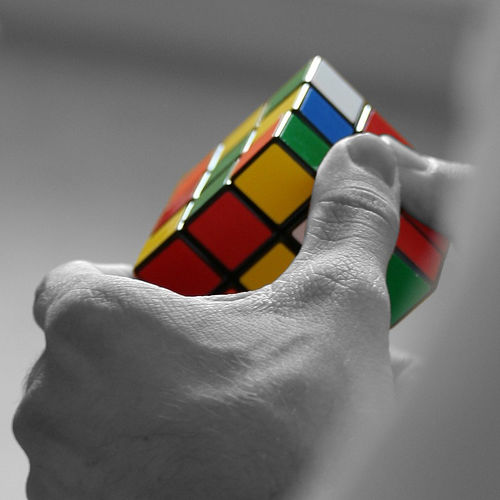
    Not too long ago, I was with my son in the local toy store helping him pick something he could spend some gift money on. Rather quickly he decided on a Rubik’s Cube. The flashbacks started rolling in…

    The first time Rubik’s Cube was all the craze (circa 1980), I had one like everyone did. I was good at solving one side and maybe a second side, but that was about it. I could not get my head around the sequences (which I now understand are algorithms) to successful completion. I became quite proficient at one of the alternate solutions, namely popping out the pieces and assembling the cube solved. This worked for me and I was quite happy about it, too.

    Fast forward to 2009 – Rubik’s Cube now comes with a little “cheat sheet” with directions on how to solve the cube. This little pamphlet is deceiving – small does not equal simple. To solve the cube, you have to understand the sequence of steps, carefully execute the algorithms (which vary depending on the current state of the cube), and trust yourself to move forward despite the disarray the cube may appear to be in. Over the course of a few days, numerous hours, and much chanting aloud of sequences such as “right inverse, down inverse, right, down,” I did it! It was one of those personal victories that you want to shout about from the rooftop, but no one really cares all that much about. I reveled in my personal milestone, and carefully (and still very slowly) repeated the victory a few times.

    So what is the moral of this story? We are all in various stages of learning throughout our lives. We are all good at some things, and not so good at some things. We all need various levels of support in our quest for learning. However, there is NOTHING impossible given the right environment with regards to learning. I do not think I have inherent ability with regards to the Rubik’s algorithms, but now that I understand what they are, I can (with much practice) reproduce them and use them as a foundation for other experiences. Could I have done the cube without specific, clear directions and answers? Most likely not; Have I learned more than I ever would have otherwise? Absolutely! The students that sit in our classes every day have some predisposition to either “get it” or “not get it,” regardless of the particular content area. How we choose to support them is central to their success.

    All students have to get from point a to point b in their learnng…some need a detailed map, and some just need us to stay out of the way. For me, it only took 30 years and a clear set of directions to understand Rubik’s algorithms. There are some who inherently understand them within a few minutes. I’m jealous of them, but I don’t care, because I can do it myself now. 🙂

    Maybe I’ll try one of the 4X4 Rubik’s Cubes next…

    Epilogue for the 21st Century: I was delighted that the cube had that cute little pamphlet with instructions. I painstakingly worked through it, re-reading many steps for clarity. I shared my experiences with others: their response to my endeavor? They looked up the solution on YouTube. I guess I still have a glaring ability to be a dinosaur…

    Photo courtesy of Caramdir on Flickr.
  • Staff Development Focus for Next Year

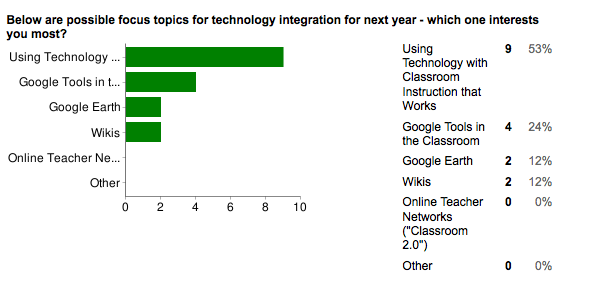
    Thanks to the staff who responded to the brief survey I sent out (it was easy & slick to do using a Google form 🙂 ). While response wasn’t huge (25%), it is the end of the year and there are a million things to get done. I think the sample is big enough to get a good sense of how to progress. So what are people interested in focusing on? Check it out…

    sdfeedbackI selected the topics for the survey based on things I’ve been working with and ideas “out there” in the world of educational technology. No scientific formula – lots of gut instinct and intuition, spiced with as much input as possible.

    Based on the feedback, here is the prioritized focus of how I’ll frame conversations with the technology committee and team meetings for 2009-2010:

    1. Using Technology with Classroom Instruction that Works – I think people enjoyed the book study here this past year on Point A to Point B because the focus is on improved learning with technology, not just about the technology. I’m looking forward to some fun and challenging conversations on implementing ideas from the book.
    2. Google Tools in the Classroom – Google continues to produce a wealth of resources for learning. While a little voice in my head continues to worry about Google controlling too much (see my kind-of-paranoid post from 2007), you can’t argue that there are some amazing resources (see my posts after attending a BOCES workshop here, here and here).
    3. Google Earth – Speaking of amazing resources, Google Earth is going to be where I spend most of my personal learning time. Every time I open up GE, some new layer, model, or other content blows me away. The experience we had in Mrs. Calandra’s ELA class with the Google Lit Trip is just one example of the power of Google Earth. I’m in the early stages of developing some sort of GE daily tidbit for the classroom – stay tuned on this one. On a personal soapbox note, as I delve into GE more and more, a thought keeps coming to me (and I am by no means the first to say this): Given the resources available in Google Earth, there is no acceptable reason for students to be deficient in geography (provided students and teachers have quality access to Google Earth). OK, that’s the end of my soapbox – let’s dig in with Google Earth!
    4. Wikis – While the response to wikis was not great, I believe part of that is due to the fact that many still need to understand what a wiki is and how it can be implemented in the classroom (though we’ve all used Wikipedia…) . The district has moved us forward in this realm as we have just purchased a wiki site through Wikispaces.

    That is certainly enough to keep us busy, but at the same time, one person brought up an excellent point. It’s not always about what’s new and what’s hot – it’s about getting better – here is the comment:

    “I know we have training in many areas, however, I feel like I need more to get all the use out of a particular tool. Something like getting more training after a year of having a Smart Board to go to the next level. That may even carry on for a couple of years. Just a thought (and not only Smart Board use other things as well).”

    That was well put, and will be part of the mix of what we do in the upcoming year. Once again, thanks to everyone who responded, and have an enjoyable summer!

  • The Children’s Machine

    Here is an audio track to accompany this post, if you like: luminous-rain
    Music courtesy of Kevin MacLeod

    My recent purchase of an XO laptop moved me to finally dip into the writing of Seymour Papert and his often-referenced book, The Children’s Machine: Rethinking School In The Age Of The Computer. Being in the midst of lots of reading for the administration classes I’m taking, I still found it a challenge to get into the academic and wordy mind of Papert. This is definitely a book that will need re-reading (and is well worth it).
    Let’s start with a few bigger-picuture ideas I took from the book:

    • It was written over 15 years ago (1993), but the concepts and challenges presented are as fresh as ever. I often found myself in agreement with Papert’s thoughts, only to realize how long ago he made them. For example, when he references “…the powerful contribution of the new technologies…is the creation of personal media capable of supporting a wide range of intellectual styles,” what was on his mind? 1993 was long before Web 2.0 (and a lot of Web 1.0), smart phones and iPods. We are only beginning to realize the power of these new technologies.
    • I particularly enjoy the focus on learning as a distinct, enjoyable activity, rather than something to get done (Yearners vs. Schoolers, chapter 1; A Word for Learning, chapter 5). Papert talks about how real-life learning is a process of discovery based on need. As we engage deeper into learning about things that are important to us, the new knowledge “sticks,” adding to previous knowledge. I like this analogy, as it resonates with how I feel I increase my technology knowledge. As I am exposed to new ideas or concepts, I can categorize them based on prior knowledge, and call on them as needed. I always enjoy going to technology workshops, even beginner workshops, because there is always some new aspect or interpretation that I can add to my own knowledge library. Papert challenges the traditional conept of school as a place that disseminates knowledge to become one that promotes discovery of it.
    • No big surprise here, but Papert explicitly explains that using the computer a a knowledge machine most likely will not increase scores on high-stakes tests. It will produce creative thinkers with a personal relationship to significant concepts and content. It is almost funny (or sad) that his responses in 1993 were to the America 2000 initiative. 15 years later, we now call it No Child Left Behind.
    • Papert makes a case that perhaps reading and writing should no longer be the first way in which children become knowledge literate. I have a REALLY hard time with that thought – but when people use video sites such as YouTube to learn, it makes one pause and think. I sure wish there were an audio or video version of the book to help me get my head more around it…

    A quote from the book that I feel sums up Papert’s thesis, and most of his work in educational computing, is as follows:

    “[Computers] should serve children as instruments to work with and to think with, as the means to carry out projects, the source of concepts to think new ideas.”

    Logo is the programming language he created, and is the central topic of discussion throughout the book to demonstrate his beliefs. Logo is not about making a turtle move around the screen; it is about making students think about their learning.

    Flashback to my high school days when I had my brand new Commodore 64 on the dining room table (you can now do the math on my age…). I sat there with the cassette drive, typing “Load, *8” and waiting 10 minutes for a program to get into memory so I could run it. I used the book on Basic to write a 60 line program that added a few numbers together. I thought to myself, “I’m not going to be a computer programmer – I’m going to be a computer user.” This appears to fly in the face of Papert’s view of the machine as learning agent.

    Fast forward to 2009 – I regularly edit the code in the template that this blog is based on to make it look like I want it to. I just finished editing the Wikipedia article on the OLPC XO-1 to include a reference to Papert’s book. I looked at the code for other parts of the entry to figure out how on earth to make the correct syntax for the entry. What happened? I moved from a user to a programmer – not a programmer in the true sense, but the code to interpret in blogging software or wiki software is far more complex that the Basic language I shunned many years ago. The difference is in the product – while it was not worth the time to spend hours writing code to add some numbers, it is worth spending time when the results are far more satisfying. To take the quote from WordPress, “Code is Poetry.”

    I’m just beginning to understand the impact of Papert’s writing, and how it affects me personally and children (and schools) overall. One thing is for sure – as we look around at the XO, netbooks, ultra-mobile PCs, smart phones, etc. – The Children’s Machine is here. What are we going to do with it?

  • Gave One Got One

    Thanks to a presentation by Brian Smith, Gary Stager and Sylvia Martinez at NYSCATE a couple of weeks ago, I get what the OLPC (one laptop per child) laptop is about. Its not about technology. Its not about schools. Its about kids, learning, and opportunity.

    I watched and considered last year while the Give 1 Get 1 program was introduced. This year, I’m not watching, I’m in. I ordered an XO at Amazon, and it just arrived. Another one is on the way to a kid somewhere in the world. I’ll never know which kid, but that’s OK. It’s like blood donations – you give because you should, and you know some good will come of it.

    What am I going to do with the one I received? I’m going to put it in the hands of my five and four year old kids, sit next to them, and learn with them. I’m going to do my best to NOT see how fast it performs, if I can check my work email, or any of the other typical adult uses. The interface and OS are totally different, and that’s OK (perhaps great). The XO is about kids learning.

    I don’t know how many XO users are in the Buffalo-Niagara region, but we’ll be heading to the OLPC wiki to hook up with them. Maybe we’ll have to create a local group so kids can connect around here in addition to around the world.

  • Content Tech: Setting Objectives

    Content Tech
    Ideas for Technology Use in the Classroom

    Carrying on with a focus on the book Using Technology with Classroom Instruction that Works, the first planning question is: What will students learn? There is one instructional strategy associated with this question, setting objectives.

    “…when students are allowed to set some of their own learning goals, their motivation is higher than when they pursue only teacher set goals…” (p.18)

    Taking the time to have students involved in the learning goal process can be a challenge, especially when teachers often know exactly which goals will help the most. As the quote above clearly says though, student engagement increases when they have the time to reflect and provide input into their own learning (something that is true of adult learners as well).

    Most of the tools presented in this section represent technology making processes more efficient (e.g. word processing a KWHL chart, emailing a newsletter). One that stands out as a real enhancement of the setting objectives strategy is to use organizing and brainstorming software with sound recording capability to create a audio/visual KWHL chart.

    We have Inspiration software on all of our computers. Consider the possibility of creating a template in Inspiration with the topic of your next unit on it. As a pre-assessment of understanding, ask students to rapid-fire the KWH pieces of the diagram, AND record a sound clip for each of those items providing more detail or an example. This multi-modal feedback would activate more input from the students and possibly reveal more understanding or lack of understanding.

    The authors point out a challenge with using software such as Inspiration since most students do not have it at home to use. This relates exactly to the post I wrote a few months ago about making software accesible. A solution in this case would to use an open source solution, such as Cmap. Using Cmap would break down the walls between school and home.

    For the next Content Tech, we’ll be looking at the instructional strategy of providing feedback.

    Book citation:
    Pitler, H., Hubbell, E. R., Kuhn, M., & Malenoski, K. (2007). Using technology with classroom instruction that works. Alexandria, VA: Association for Supervision and Curriculum Development.

  • Content Tech: Using Technology with Classroom Instruction that Works

    Content Tech
    Ideas for Technology Use in the Classroom

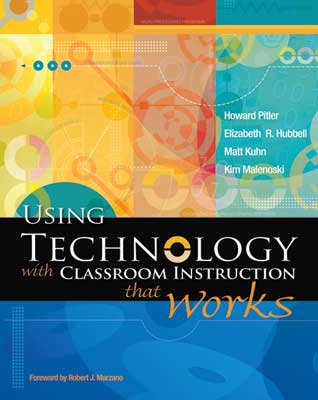
    We are familiar with Marzano’s research in Classroom Instruction that Works. In 2007, MCREL released a supporting book, Using Technology with Classroom Instruction that Works. What is terrific about this book is that it puts technology in the proper place – as a tool to support research-proven instructional strategies.

    I’m going to take the next series of Content Tech posts to highlight the book, and discuss ways it can help us specifically in our setting here at Heim. I invite you to provide feedback and conversation through comments here or f2f discussion.

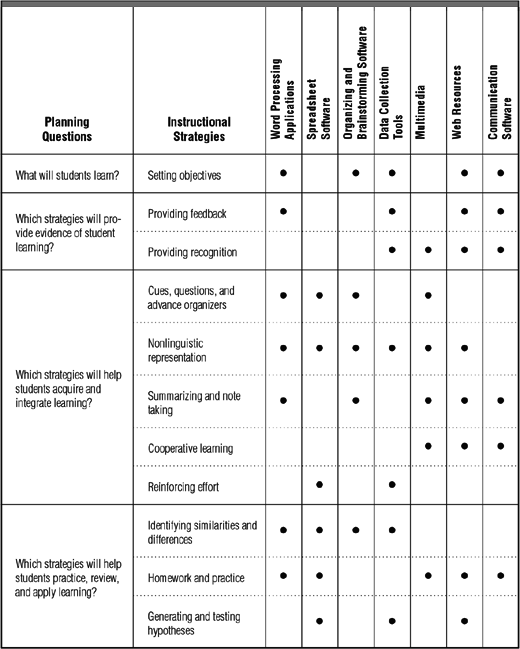
    The introduction frames how technology fits in, by providing planning questions for instruction, instructional strategies that work, and then categories of technology available.

    The four planning questions for instruction, and the associated Marzano strategies are:

    • What will students learn?
      • Setting objectives
    • Which strategies will provide evidence of student learning?
      • Providing feedback
      • Providing recognition
    • Which strategies will help students acquire and integrate learning?
      • Cues, questions and advance organizers
      • Nonlinguistic representation
      • Summarizing and note taking
      • Cooperative learning
      • Reinforcing effort
    • Which strategies will help students practice, review, and apply learning?
      • Identifying similarities and differences
      • Homework and practice
      • Generating and testing hypotheses

    Note that 2 of the original 9 strategies have been split above in order for them to be addressed more specifically.

    Technology to support the above questions/strategies have been broken into the following seven categories:

    • Word processing applications
    • Spreadsheet software
    • Organizing and brainstorming software
    • Multimedia
    • Data collection tools
    • Web resources
    • Communication software

    The following matrix shows which categories of technology best support which strategies (click to enlarge):

    I’ll be exploring each of the strategies and supporting technologies in coming weeks. What initial thoughts/comments do you have about looking at technology this way?

    Image citations:

    “Book Cover.” Association for Supervision and Curriculum Development. 5 Nov.
    2008 <http://shop.ascd.org/ProductDisplay.cfm?ProductID=107025>.

    “Matrix.” Association for Supervision and Curriculum Development. 5 Nov. 2008
    <http://www.ascd.org/ASCD/images/publications/books/pitler2007_fig7.gif>.

  • What in the Wordle Does This Mean?

    Thanks to Doug Johnson and his Blue Skunk Blog, I just learned of a neat tool, Wordle. You can paste a blob of text, or enter a URL, RSS feed, or Del.icio.us user, and see a word cloud created based on the content provided. The resulting image can be customized by color and shape.

    When I entered the URL for this blog, here is the result:

    So it appears I talk about software quite a bit. I like that students shows up quite a lot. Open and source appear more than I would have expected, but I like that too. I wish that learn, learner, and learning were in more abundance.

    This is a neat, informal, assessment of what the blog has been about. I probably do talk alot about software since its easy to write about new tools (like Wordle…). I like to think I focus more on learning, but its so easy to get caught up in the tools. What in the Wordle does this mean? What fun food for thought…

  • Podcasting in Science Class

    One of the best technology conferences recently was one I did not go to. Rather, it was one I was supposed to go to, but due to a very busy schedule in the labs, could not. So at the last minute I approached a science teacher to go in my place.

    It was the best thing that could have happened. Mrs. Merlino went to Riding the Digital Wave 2008 at our regional BOCES site, and got hooked immediately on podcasting.

    Why was this best? Because since I go to many events and see many new things, I sometimes spend too much time thinking about how something could be rolled out, or what the logistics are, etc. I’ve been hooked on podcasts for a few years now but never got over the hump of getting them into the classroom. Mrs. Merlino saw the end product of podcasting at the conference, and came back to me for the details. With a bit of leg work, we soon had a plan, a podcast feed host, and results.

    I’d like to share an example of her podcasting with you. For this initial attempt she was doing an end-of-year review show to help students prepare for the final exam. As we worked together, I suggested that she get students talking, and present it in a way other students could relate to. In this example, Mark and Kevin talk about moon phases (total time = 3:33):

    Get the Flash Player to see this content.

    moonphases.mp3

    Note the player above is audio only, although it looks like a video window.

    One of the very useful tools with this medium is that when you engage in a dialogue, you can talk through the thinking process. In other podcast episodes, Mrs. Merlino speaks with students, and when they don’t understand, they discuss that. This is a huge learning tool!

    To listen to some of the other episodes in her podcast, titled Merlino’s Mystery Media:

    Click here to subscribe in iTunes

    Click here to subscribe via an RSS aggregator

    Her students are coming in this week to create their own podcasts – it should be really cool!

  • Performing Knowledge

    We recently completed a video project with one of our social studies teachers. This 7th grade project involved students picking one topic from the curriculum, and interpreting it with video in some form. We showed the students some samples from TeacherTube, including some done locally in a Buffalo high school. We then set them loose with teams, storyboards, equipment, and guidance.

    What I love about video projects is that since the focus is on performing knowledge, rather than just repeating knowledge, you get a better picture of what the students really know. While this can be either rewarding or scary, it still gets to the deeper understandings they have.

    Quite a few different classes have created video projects this year, with some exciting results. I’m looking forward to many more next year!

    18th_century_engraving_of_commedia_dell_arte_actors_on_stage__medium.jpg

    Image citation:

    18th-Century Engraving of Commedia Dell’arte Actors on Stage. Corbis. 2006.
    unitedstreaming. 29 May 2008
    <http://streaming.discoveryeducation.com/>

  • Where is the Middle Ground?

    Somewhere between Twitter in the Classroom and old school lecture-till-you-drop teaching is a middle ground that begs to help move our classrooms forward.

    The majority of K-12 classrooms today are f2f. How do we acknowledge and incorporate that underlying fact? The online, global, always connected network is incredible, valuable, necessary and worthwhile, but how do we foster and manage the transition to this new learning space within the framework of what is going to be the classroom of the foreseeable future?

    How will we get from point a to point b?

    studentsatmylecture.jpg

    ritchiescoresredo.jpg

    twitterymacworld.jpg


    Image citations:
    Interplast. “Students At My Lecture.” Flickr. 6 April 2008. http://www.flickr.com/photos/interplast/15968190/
    C o a c h. “Ritchie scores (redo). Flickr. 6 April 2008. http://www.flickr.com/photos/alleneagleshockey/381866241/
    Juque. “twitter y macworld.” Flickr. 6 April 2008. http://www.flickr.com/photos/juque/350786064/